One of the projects I was involved in was a sports streaming platform (similar to Twitch). The owner operated in a large market and expected a big audience. The platform was new, and we had a short runway before the first major live stream.
One of the key features was real-time chat while viewers watched auto races. Based on early estimates, we expected 200k+ concurrent users for the first event. Only registered users could write, but everyone could read, and all viewers needed near real-time delivery. We planned for a WebSocket-based chat for all users.
The rest of the platform used .NET for APIs and background jobs, Postgres as the primary database, Redis for caching, and a Next.js client. For encoding and CDN, we used multiple providers with geo-distributed fallbacks.
Our initial idea was SignalR backed by our .NET API fleet. But with unpredictable concurrent users and limited time before launch, it was hard to size the fleet. That felt risky. A serverless approach was a better fit because usage was spiky and event-driven.
That is where Cloudflare Durable Objects came in. We already used Cloudflare: our API gateway ran on Workers, the Next.js client was deployed on Workers, and we relied on Cloudflare for DDoS protection and WAF rules. Adding Durable Objects was a natural choice.
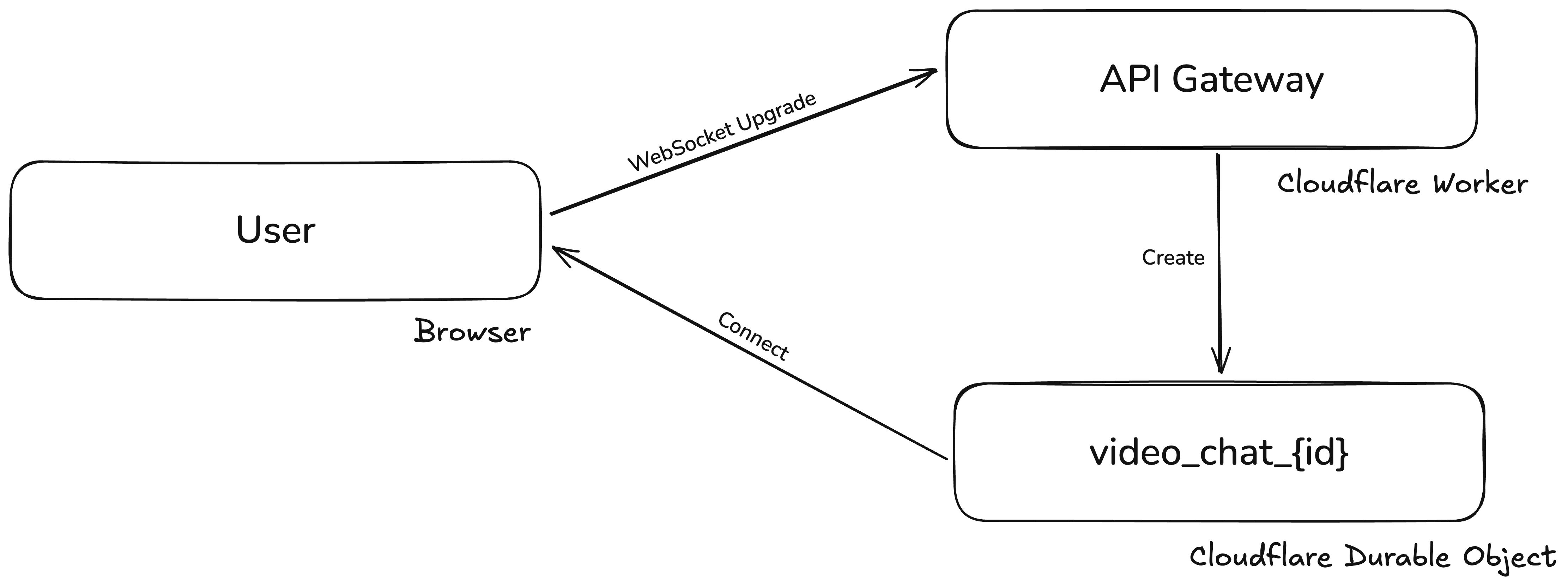
Durable Objects let you maintain long-lived WebSocket connections with per-object state. The basic flow looked like this:
- Web client makes a request to the API gateway (Cloudflare Worker).
- The Worker recognizes a WebSocket request, validates it, parses the video ID, creates a Durable Object for that video, and forwards the request.
- The Durable Object accepts the WebSocket and owns the connection (all connections for a video in a single object).
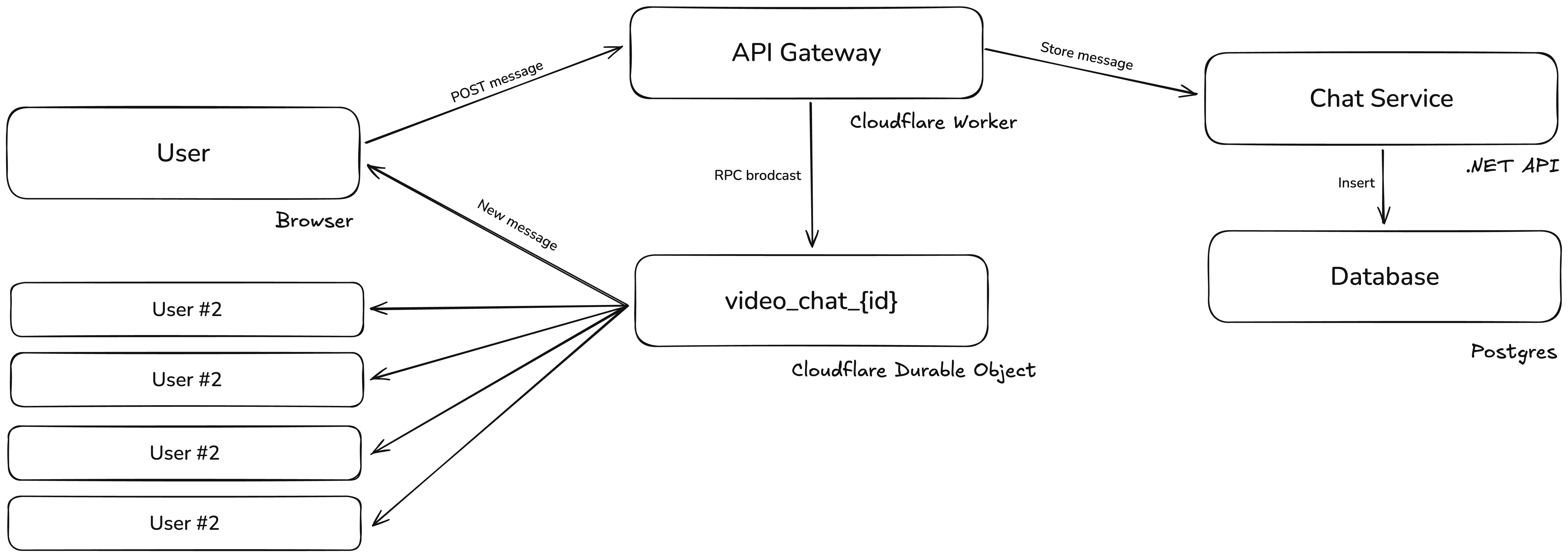
- When a message is posted, it hits the API gateway.
- The gateway validates and forwards it to the chat storage service.
- The chat storage service writes to the database and returns metadata.
- The Worker calls the Durable Object (RPC) to broadcast the message.
- The Durable Object iterates over WebSocket connections and pushes the new message.
That is all it takes, except for one serious limit: Durable Objects have a soft cap of about 1,000 requests per second. It is high, but with hundreds of thousands of concurrent users, we could hit it quickly. We needed to scale beyond a single object per video.
The answer was sharding. Instead of placing everyone in one Durable Object, we would spread users across many. But we needed a deterministic way to assign users so we did not create too many objects. Given the soft limit, we targeted about 500 users per object. Random assignment would either require a predefined shard count or create too many empty rooms on low-traffic videos.
We needed a shared state to track which rooms existed and how full they were. Our first attempt used Cloudflare D1 (serverless SQLite):
- Create a ChatRoom Durable Object that holds WebSocket connections.
- Create a D1 table
chat_roomsto store room state. - On connection requests, the gateway chooses the next room:
- Find the first room with fewer than 500 connections.
- Rooms are named with a counter:
room_1,room_2, etc. - If no room is available, create the next one.
- Forward the request to that Durable Object.
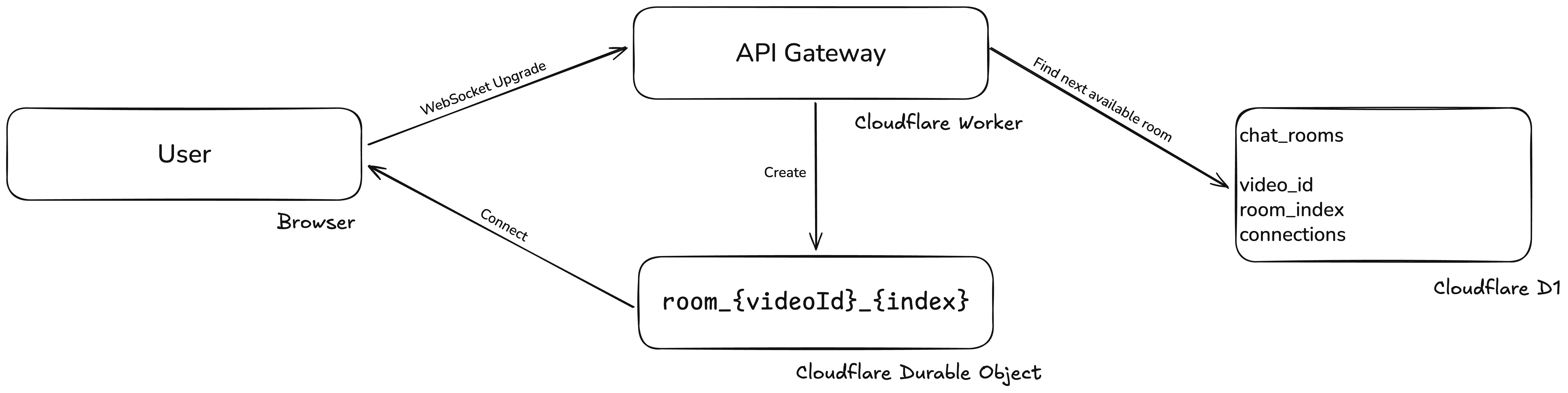
The approach worked, but load tests showed D1 write limits on the connection path. The bottleneck was the initial assignment; afterward, everything stayed within the ChatRoom Durable Object.
If D1 could not handle the load, we could use Durable Objects as the orchestrator. Each Durable Object has its own SQLite-backed state, but a single orchestrator could also become a bottleneck. So we sharded that layer too, with a fixed number of orchestrators. The final design:
- For each video, create 5 orchestrator instances.
- Each orchestrator tracks the rooms it owns.
- On connection, the gateway randomly selects one orchestrator.
- The gateway asks the selected orchestrator for an available room.
- The orchestrator consults its SQLite state and returns a room name like
room_{videoId}_{orchestratorIndex}_{roomIndex}. - The gateway forwards the request to that Durable Object and completes the WebSocket handshake.
- The rest is handled by the room itself.
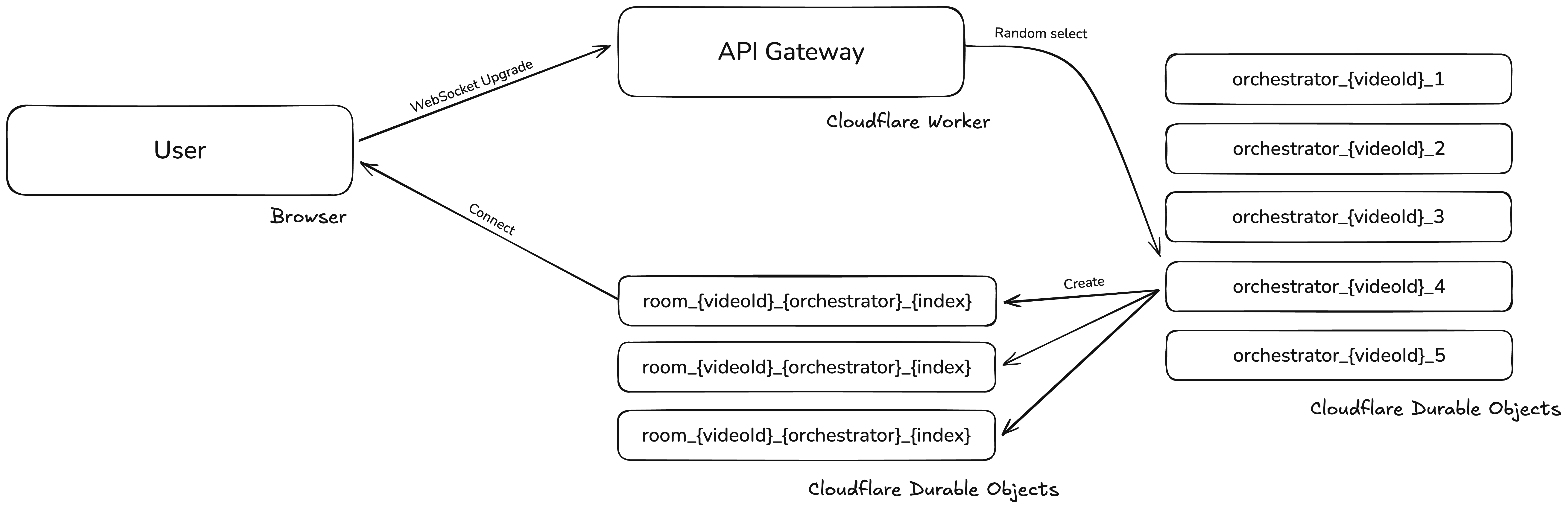
With five orchestrators, we scaled burst capacity to roughly 5,000 requests per second (soft limit; in practice it can go higher). We also implemented client-side retries so failed connection attempts would recover.
There were a few extra challenges to handle.
Race conditions: between room assignment and the actual socket open, other requests can race and exceed the 500 limit. We handled this in two ways:
- When the orchestrator returns a room, it optimistically increments the room’s count in SQLite.
- As a backstop, the room checks its in-memory connection count on accept. If it is at capacity (default 500, configurable), it returns
429. The gateway then asks for a new room, retrying up to 10 times.
The next challenge was keeping the orchestrator’s counts accurate. After assignment, the connection goes straight to the room and the orchestrator does not know if it succeeded. We solved this with the Durable Objects alarms API (a scheduled callback, similar to setTimeout):
- On each connection, if the room has no alarm scheduled, it schedules one for 5 seconds.
- When the alarm fires, the room checks active connections via the Durable Objects API, then RPCs its orchestrator (based on room name) with the current count.
- The orchestrator updates its state. If the room is empty, it clears local state and stops scheduling; otherwise it schedules the next alarm 5 seconds later.
This state keeps the room count minimal by always using the first available room under the limit. For example: if room_1 and room_2 are at 500, room_3 has 400, and room_4 has 50, we fill room_3 until it reaches the limit. If a connection drops from room_1, the next connection goes there. Balancing by lowest occupancy would create too many rooms with low utilization; the “first available” strategy keeps the number of Durable Objects bounded. A 500-connection limit is still manageable in a single room.
We also needed to broadcast the total number of viewers for each video. Each orchestrator already knew the counts for its own rooms, but we needed cross-orchestrator aggregation. We implemented a periodic sync:
- Each orchestrator runs an alarm that RPCs the other orchestrators.
- They exchange their current totals and store the results.
- Each orchestrator then computes the full total and broadcasts it to its rooms, updating the viewer count in the UI.
Broadcasting chat messages is similar: the gateway notifies all five orchestrators, which broadcast to their rooms, which in turn push the message to all WebSocket connections.
Some smaller but important details:
- A Durable Object cannot introspect its own name, so we pass the room name as a header during the WebSocket upgrade request.
- Deploying a Worker restarts its Durable Objects and drops connections. We split the gateway Worker from the orchestrator/chat Worker and used a remote service binding between them. This lets us deploy gateway changes without killing live connections.
- Durable Objects are billed by active runtime. With WebSockets, we use the hibernation API to keep sockets alive while the object sleeps when idle.
- We saw cases where a socket appeared open server-side but had actually closed on the client. To detect this, we added a ping every minute. The room stores the last ping timestamp per connection and closes any connection without a ping in the last 90 seconds.
To load test, we used k6 with a custom script that opened WebSockets, sent pings, and held connections for a defined duration. We ran the k6 Kubernetes operator from four clusters in different regions and reached 300k concurrent WebSocket connections. While that was running, another script posted chat messages via the API, and the k6 clients verified viewer counts and message delivery. We stopped at 300k because we hit port exhaustion issues in the Kubernetes clusters (and, yes, we briefly impacted some production services while testing).
One more story: during development, we ran into a Durable Objects bug involving alarm scheduling under certain state transitions. Objects would enter a corrupted state and become unusable. With many objects created during load tests, we hit this occasionally. Logs did not help much, so our workaround was to change name patterns and create fresh objects. A few weeks later, someone from the Durable Objects team reached out after noticing rare errors from our account. We shared our usage patterns and they fixed the issue.
This was the first version of the chat system. After a few months in production, we saw that the orchestrator model was not ideal: too many unnecessary Durable Objects were created, and the extra reads and writes drove costs up. Once we released a new version of our .NET API, we moved orchestration there and now use Redis to manage active rooms and connection counts. The WebSocket connections remain in chat room Durable Objects.