When I started building Colanode, I had two core principles:
- Open source and easy to self-host, with the goal of making Colanode the default collaboration infrastructure.
- Fast and always available (even offline), because it is the type of app you use every day.
These goals shaped most of the technical decisions. Around that time, I discovered the local-first movement: your data lives on your device first and syncs to the server in the background. That sounded perfect. I had never built a local-first app, so I figured how hard could it be? Right? Right?
Four rewrites later, we have a version that covers most cases but still leaves room for improvement. This post explains what we built and why.
I started by researching the space, watching videos and reading blogs by teams that built sync engines (Linear, Figma, Notion, etc.), and digging into common architectures and failure modes. I also reviewed existing open-source sync engines, but most of them came with constraints I did not want to inherit in Colanode. That is why I decided to build one from scratch.
First, the stack. I wanted it boring and simple: a TypeScript monorepo with Node.js on the server, Electron + React + SQLite for the desktop app, Postgres for data, Redis for cache and background jobs, and S3 for file storage. The sync engine sits on top of this stack without introducing new dependencies.
Data model
Colanode supports chats, channels, pages, databases, views, records, folders, and files. All of it needs to work offline-first. The first challenge was designing a data model that is simple to query and extend.
We settled on the concept of a “node” which represents anything a user can create in Colanode (and the origin of the name). All nodes share common fields plus a nested attributes object that varies by node type. This design is inspired by the ProseMirror document schema we use in the editor.
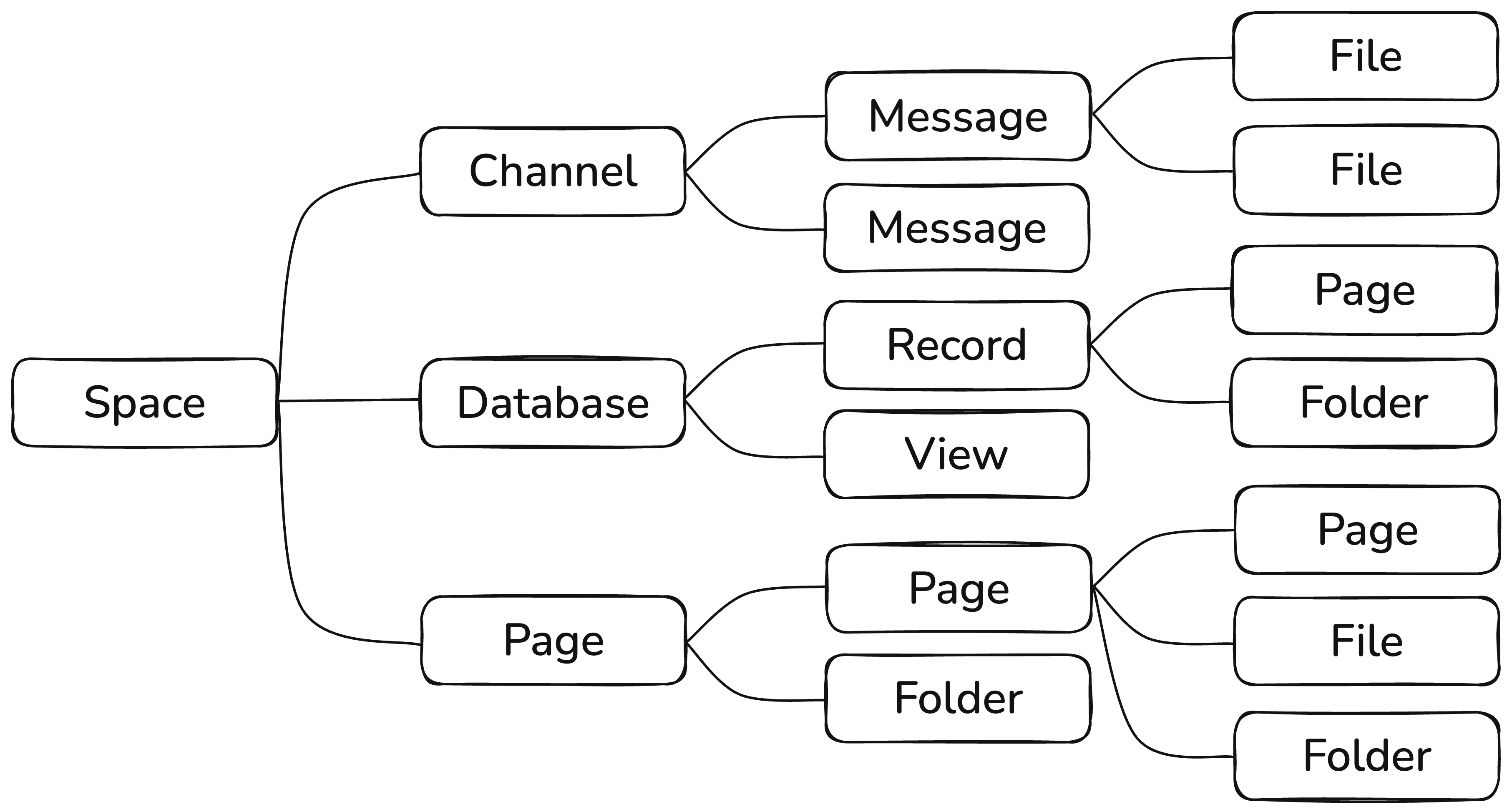
For example, a channel node looks like this:
{
  "id": "ulid",
  "type": "channel",
  "attributes": {
    "name": "Announcements",
    "avatar": "ulid",
    "description": "This channel is for company-wide official announcements"
  },
  "parentId": "string",
  "createdBy": "ulid",
  "createdAt": "timestamp",
  "updatedBy": "ulid",
  "updatedAt": "timestamp"
}
Meanwhile a message node looks like this:
{
  "id": "ulid",
  "type": "message",
  "attributes": {
    "subtype": "standard" | "question" | "answer",
    "referenceId": "ulid",
    "name": "string",
    "content": {
      "block_1": {
        "type": "paragraph",
        "text": "Hey everyone, check out this screenshot from the app"
      },
      "block_2": {
        "type": "file",
        "fileId": "ulid"
      }
    }
  },
  "parentId": "string",
  "createdBy": "ulid",
  "createdAt": "timestamp",
  "updatedBy": "ulid",
  "updatedAt": "timestamp"
}
The attributes object holds the actual content. We maintain a registry of node attribute schemas using Zod, which provides validation and type safety. This design is easy to extend: we simply add a new node type to the registry and the sync engine handles everything else. All that remains is building the UI for the new node type.
For example, the schema for defining a record node looks like this:
export const fieldValueSchema = z.discriminatedUnion("type", [
  {
    type: z.literal("boolean"),
    value: z.boolean(),
  },
  {
    type: z.literal("string"),
    value: z.string(),
  },
  {
    type: z.literal("string_array"),
    value: z.array(z.string()),
  },
  {
    type: z.literal("number"),
    value: z.number(),
  },
  {
    type: z.literal("text"),
    value: z.string().describe(ZOD_TEXT_DESCRIPTION),
  },
]);

export const recordAttributesSchema = z.object({
  type: z.literal("record"),
  parentId: z.string(),
  databaseId: z.string(),
  name: z.string(),
  avatar: z.string().nullable().optional(),
  fields: z.record(z.string(), fieldValueSchema),
});
Conflict resolution
Multiple users can make changes to the same node concurrently. One user updates one field while another updates a different field on separate devices at the same time. Even without true concurrency, conflicts arise: a user can make a change while offline, and by the time they reconnect, another user’s changes have already synced to the server. This brings us to conflict resolution algorithms.
There are different types of algorithms, but the most common are:
- Last write wins. Whatever arrives last becomes the stored value. Simple and common, but it loses intent.
- Three-way merge (diff/patch), typically used in version control systems like Git.
- Operational Transformation (OT), the classic approach used in collaborative editors like Google Docs.
- Conflict-free Replicated Data Types (CRDTs), which provide convergence guarantees without a central authority.
Given our requirements (offline-first and concurrent edits) we chose a hybrid approach: CRDTs for conflict resolution, plus a central server for validation, authorization, and relaying changes (an approach Figma uses as well). Multiple CRDT implementations exist, such as Automerge and Yjs. At the time, Yjs had better performance and storage usage based on benchmarks, so we chose it for Colanode.
Yjs provides a set of data structures that sync automatically. In our case, each node corresponds to one Yjs Document. Yjs provides a data structure called YMap, a key-value which we use for storing node attributes. Map values can be nested data structures with their own sync logic, such as the Text data structure or the YArray. Here is how we represent record attributes in Yjs:
import * as Y from "yjs";

// create the Y.Doc
const ydoc = new Y.Doc();

// retrieve the attributes map
const attributesMap = ydoc.getMap("attributes");

// set the attributes
attributesMap.set("type", "record");
attributesMap.set("parentId", "database_1");
attributesMap.set("databaseId", "database_1");
attributesMap.set("name", "Product #1");

// create a nested map for the price field
const priceFieldMap = new Y.Map();
priceFieldMap.set("type", "number");
priceFieldMap.set("value", 99.9);

// create a text field, that supports collaborative editing.
// text operations work by inserting or deleting content in a certain position
const descriptionText = new Y.Text();
descriptionText.insert(0, "This is the first product in our store");

// create the field map
const descriptionFieldMap = new Y.Map();
descriptionFieldMap.set("type", "text");
descriptionFieldMap.set("value", descriptionText);

// create the nested map for field values and add it to attributes
const fieldsMap = new Y.Map();
fieldsMap.set("field_1", priceFieldMap);
fieldsMap.set("field_2", descriptionFieldMap);

attributesMap.set("fields", fieldsMap);
All changes in Yjs produce an update, an encoded binary array containing the operations performed. You can apply that update to any remote YDoc in any order and get the same final result. Operations are also idempotent, meaning you can apply the same operation multiple times without errors. Here is what happens when a user updates the name of a product:
// a remote ydoc
const remoteYDoc = new Y.Doc();

// store all updates performed in YDoc
const updates: Uint8Array[] = [];
remoteYDoc.on("update", (update) => updates.push(update));

// update the name
const remoteAttributesMap = ydoc.getMap("attributes");
remoteAttributesMap.set("name", "Real product name");

// applying changes to the local ydoc from above
for (const update of updates) {
  Y.applyUpdate(ydoc, update);
}

console.log(attributesMap.toJSON());

// this should print the record attributes with the updated name
{
  "type": "record",
  "parentId": "database_1",
  "databaseId": "database_1",
  "name": "Real product name",
  "fields": {
    "field_1": {
      "type": "number",
      "value": 99.9
    },
    "field_2": {
      "type": "text",
      "value": "This is the first product in our store"
    }
  }
}
As you can see, there is a lot happening under the hood. Doing all of this manually would require a lot of boilerplate and would be error-prone. To avoid that, we built an abstraction on top of Yjs and Zod schemas that automatically applies changes given an attributes object and its schema. The abstraction chooses the right Yjs data structures based on the schema and performs the correct operations. It also compares values to avoid emitting updates when nothing actually changed. There are additional tricks around arrays, deep nesting, and reordering, but we will save those for another post.
Local sync flow
What happens when a user creates a record in Colanode? First, the UI builds the necessary attributes from the form and sends them to the local node service, which handles storage and prepares the data for sync. This service uses SQLite for storing data and serving it to the UI.
There are four main tables the client uses for nodes and sync:
nodes: last resolved attributes, used for query and UI rendering.node_updates: local updates that are not confirmed by the server yet.node_states: the compacted, server-confirmed state for each node.mutations: pending changes not synced with the server yet (create, update, delete).
The node service generates a new id, builds a Y.Doc from the attributes, and produces an update (a binary array). We assign the update a unique id, insert it into node_updates, and create a row in mutations queued for sync. Once that is done, the UI is updated optimistically and the record is visible immediately.
The background sync service retrieves pending mutations and sends them to the server. It retries with exponential backoff when the device is offline or the server is unavailable, debounces rapid changes, and batches mutations. When the server confirms a mutation, the client deletes it from mutations and continues.
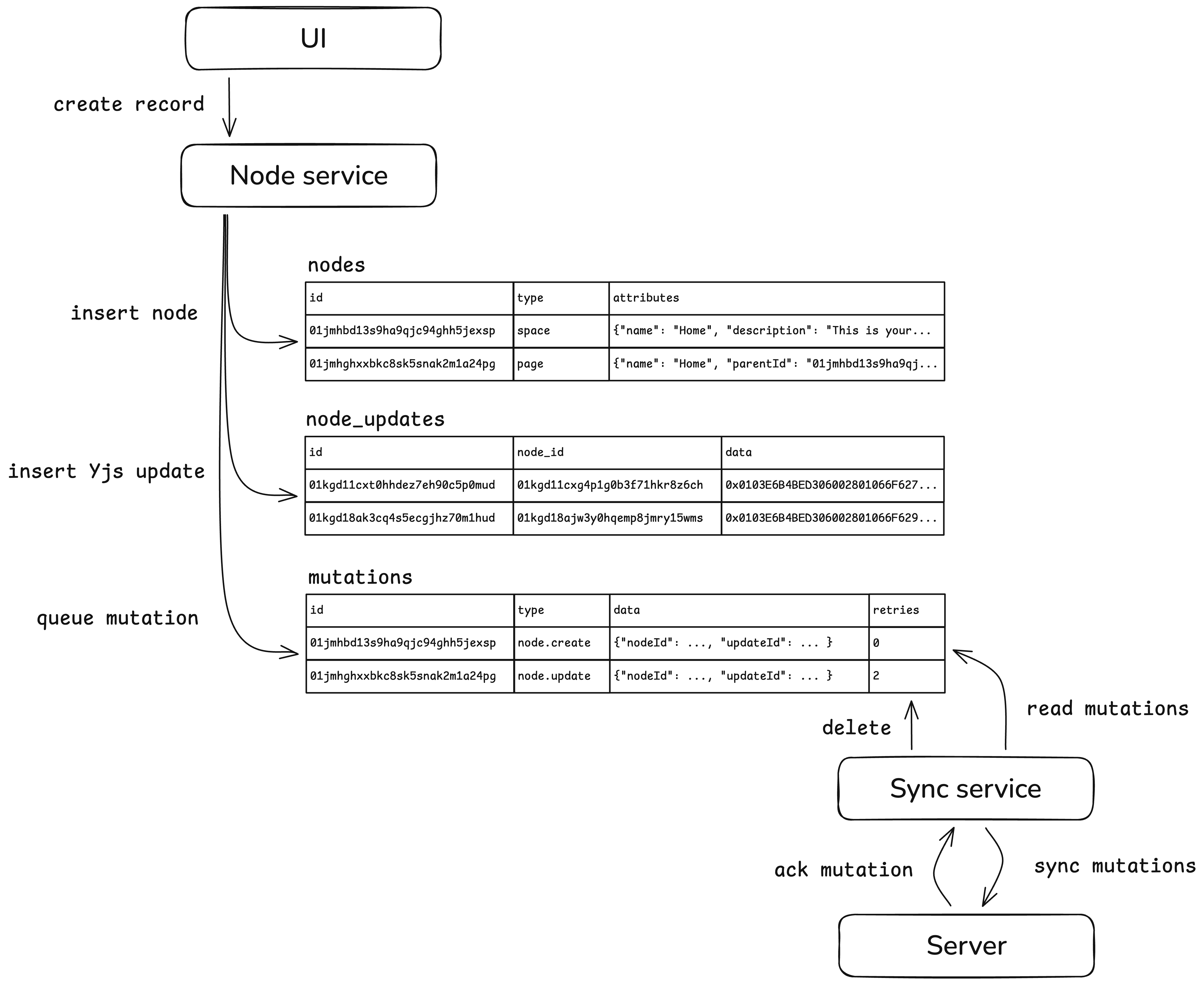
Updates follow the same pattern. The UI sends new attributes to the local node service, which loads the current node state from node_states, applies any pending node_updates, rebuilds the Y.Doc, and then applies the new changes. That produces a new update, and the service updates nodes, inserts into node_updates, and appends a new mutation.
Deletes are handled similarly: we remove the node from nodes and insert a delete mutation. The node_updates and node_states entries are cleared after the deletion is confirmed, which also allows us to roll back if needed.
Speaking of rollbacks: if a mutation fails after multiple retries (for example, due to invalid data or authorization issues), we revert it:
- Create: delete everything related to the node.
- Update: delete the failed
node_updateand rebuild attributes fromnode_statesand remainingnode_updatesintonodes. - Delete: recreate the node locally from
node_statesandnode_updates, then restore it intonodes.
Server sync flow
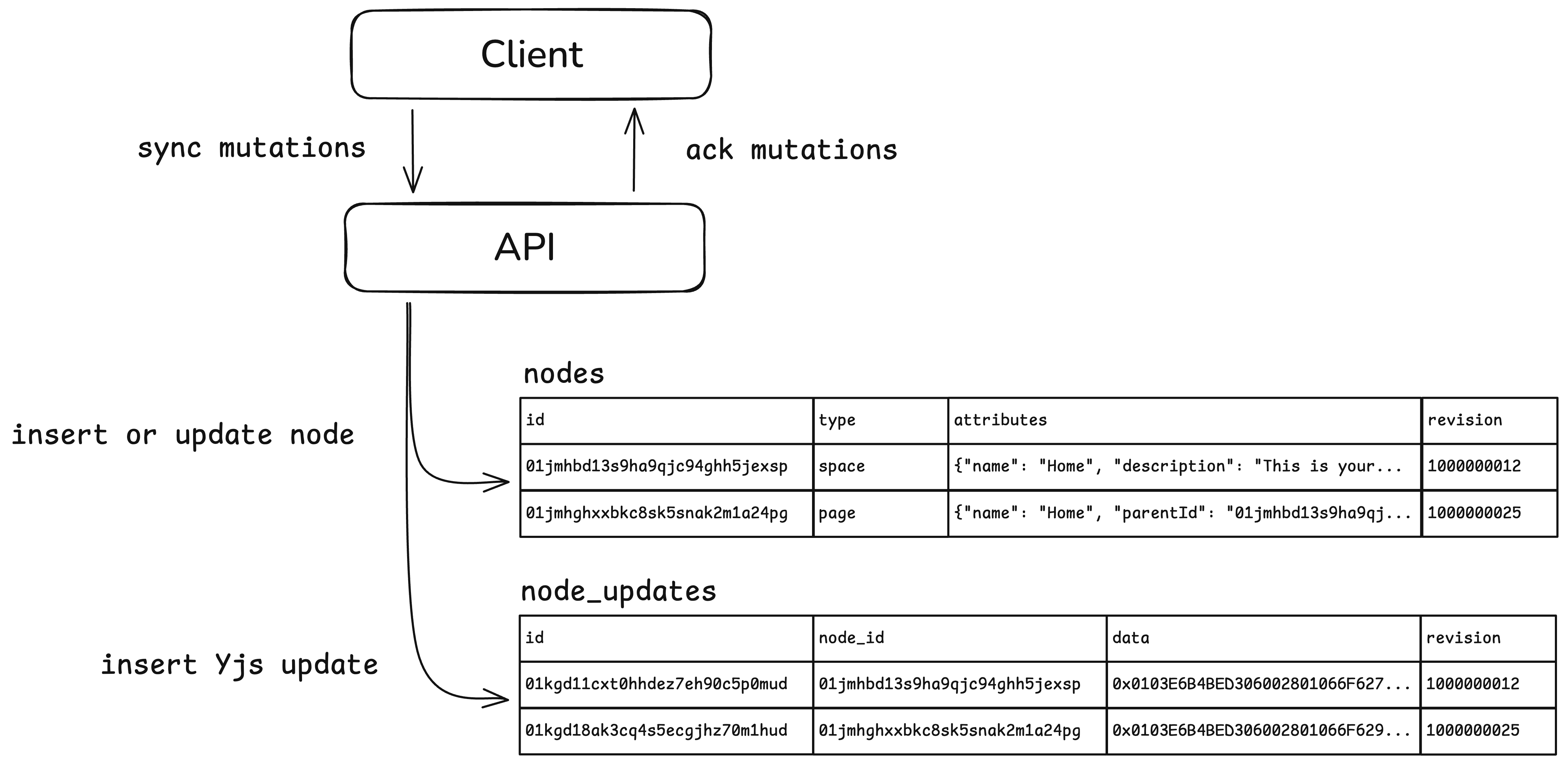
When a node update mutation arrives at the server, we perform a similar flow. First, we run validation and authorization checks. There are two main tables in Postgres for nodes and sync:
nodes: last resolved attributes, used for queries and filtering.node_updates: all updates performed for a node.
We use the same YDoc abstraction (one benefit of a full-stack TypeScript monorepo), but in reverse. We apply the update to a new YDoc and retrieve the attributes from it. If validation passes, we insert the attributes and metadata into the nodes table, store the update in node_updates, and confirm the mutation to the client.
A crucial detail in node_updates is the revision column: a globally ordered sequence of updates that is assigned by a Postgres sequence. We use it for two things. First, it prevents race conditions during server-side updates: we store the last committed revision in nodes and check it before writing so we do not overwrite a node that was updated concurrently. Second, it provides the ordered log needed to stream updates to clients, which we will cover next.
You might wonder how large the node_updates table can get. The answer is: quite large. This is a tax you pay for using CRDTs. In our case, the benefits outweigh the storage cost. Beyond full offline capability, this approach provides a complete, granular history of changes for each node, something users often want.
Based on usage patterns from our cloud users, we are implementing several optimizations. First, we are testing a background job that merges multiple updates on the same node within a short timespan into a single compacted update. This reduces the number of rows and can also decrease the size of the Yjs updates, depending on the merged operations.
Another pattern we have observed is users working on a single document for extended periods, resulting in a large number of updates for that node. Rebuilding the YDoc from all changes becomes slow. Our next optimization is to introduce a compacted final state (similar to what we do on the client) for nodes with many updates.
Client-server sync flow
We have covered how changes are stored locally and on the server. The next question is: how do we ensure all changes reach all clients that should receive them? This is the most challenging part of the sync engine, guaranteeing that all changes are delivered in the correct order. Clients can go offline for days and need to receive all changes that occurred during that time. Users might also log in on a new device and need their complete data locally.
The best analogy for Colanode’s sync mechanism is the Kafka consumer pattern. Each client is a consumer that reads all node updates sequentially and syncs them locally. When clients go offline and return, they continue from where they left off. We guarantee at-least-once delivery and we accept receiving the same update multiple times because Yjs updates are idempotent
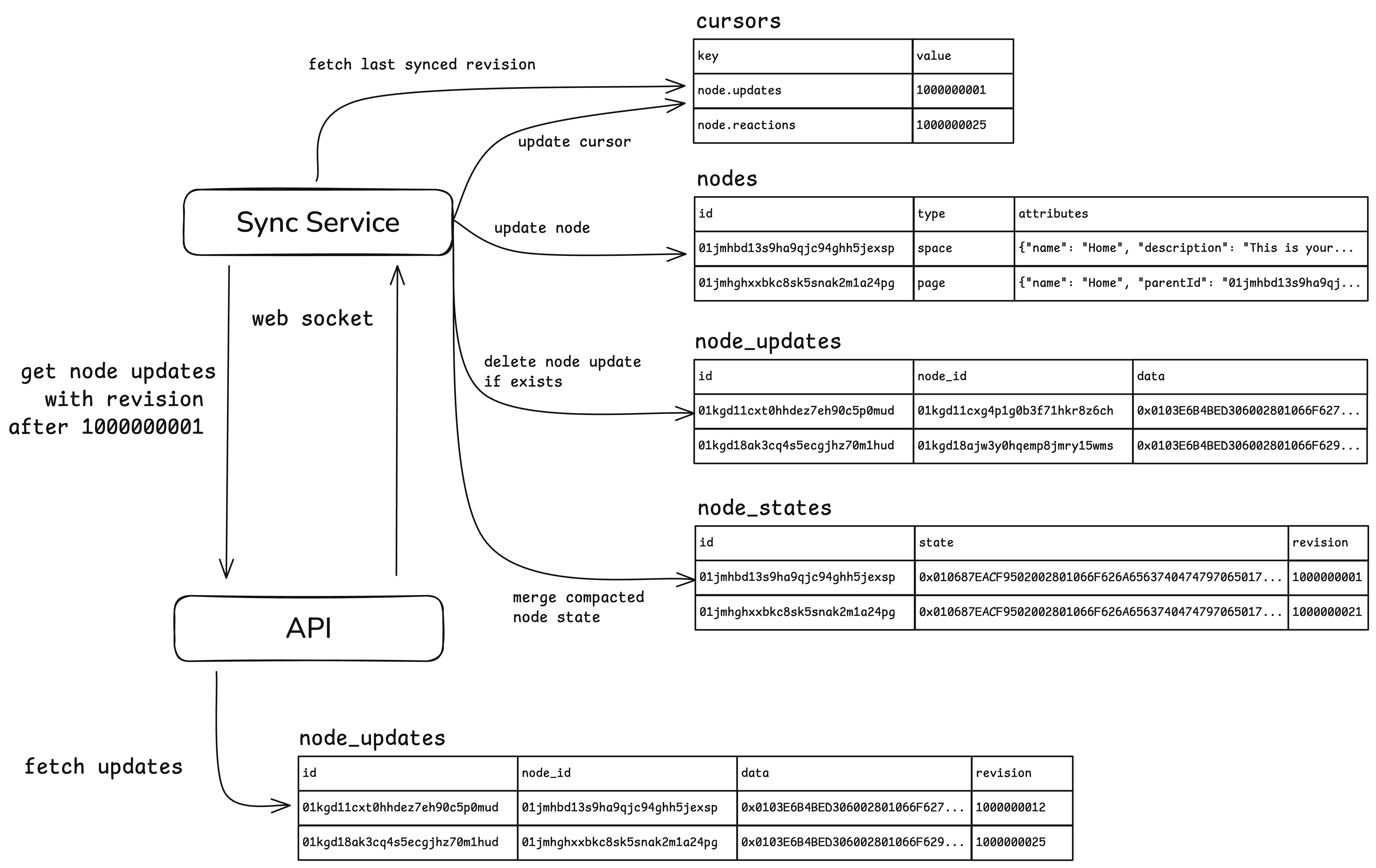
This is where the revision column comes into play. When the client starts, it opens a WebSocket connection and requests unsynced updates starting from revision 0. The server fetches the next batch from node_updates and sends it back.
This is one benefit of a local-first architecture: since all reads and filtering happen on the client, the server primarily needs to optimize for this query:
SELECT *
FROM node_updates
WHERE workspace_id = {workspaceId}
AND revision > {revision}
ORDER BY revision
LIMIT 50;
On the client side, we store the last synced revision in SQLite in a cursors table. Each subsequent request uses that revision to fetch the next batch. If there are no new updates, the server keeps the request in memory (long-poll style) until something new arrives.
When a new node update is inserted, the server broadcasts a message through Redis pub/sub to other server instances. When a server receives it, it checks for waiting clients, queries the database, and sends the updates. We intentionally re-query the database instead of pushing the update directly to avoid race conditions and preserve order.

Every node update has a unique id generated client-side. When a client receives an update, it checks whether it already exists in node_updates (meaning it was a local, unconfirmed update). If it does, the client removes that entry because the server has now confirmed it.
We also compact updates on the client. Once updates are confirmed, we merge them into a single state in node_states (Yjs compacts operations when encoded as a single state update) to keep storage small. That looks like this:
import * as Y from "yjs";

// create the Y.Doc
const ydoc = new Y.Doc();

// apply all updates
for (const update of updates) {
  Y.applyUpdate(ydoc, update);
}

// encode all ydoc updates as a single state
const state = Y.encodeStateAsUpdate(ydoc);

// store the state in node_states table
When a user logs in on a new device, the app performs a full sync. It can take some time for users with large datasets, so we need to improve the initial sync UX and add progress indicators.
Access
Colanode consists of workspaces that contain multiple users. Each user has access to a subset of nodes, and the sync engine must only deliver updates they are allowed to see. This is tricky because nodes form a graph with multiple nested levels.
For the first version, we decided to enforce access at root nodes. A root node is a node that cannot have a parent, such as a chat or a space. For each update, we store the root_id alongside node_id, representing the root of the tree that node belongs to. We then filter updates by root_id so clients only receive what they have access to.
Another challenge is that access can be granted after a node was created. A client’s revision cursor might already be past the creation event, so it would never receive the initial state. To solve this, we track a separate cursor per root_id on the client and sync each root independently. When you gain access to a new root, its cursor starts at 0, so you perform a full sync for that root and then incremental changes.
The sync query becomes:
SELECT *
FROM node_updates
WHERE workspace_id = {workspaceId}
AND root_id = {rootId}
AND revision > {revision}
ORDER BY revision
LIMIT 50;
Deletes
Deletes are a special case. Because the server does not keep state for each client, it cannot know whether a deleted node has been synced by a client. Therefore, deletions must be delivered to all clients, even long after they happened.
To support this, we store deletions in a dedicated node_tombstones table on the server. This table contains the ids and root_ids of deleted nodes and has its own ordered revision. Clients sync tombstones separately; when they receive one, they delete everything related to that node locally. We do not store tombstones on the client.
Files
Users can upload files in Colanode, either in folders or embedded inside documents such as pages and records. Files need to sync too. We could embed binary data inside Yjs, but large files make that impractical. Instead, we treat files as separate objects.
File metadata is stored and synced like any other node, using Yjs and the update log. When a user adds a file, it is copied into the app’s local data directory and queued for upload. Uploads wait until the file node is confirmed by the server, then the client uploads the binary using the tus resumable upload protocol.
While file metadata syncs to all clients, the actual file contents are downloaded on demand. If the file can be previewed (image or video), opening it triggers a download. The file is then cached locally and rendered without re-downloading on the next open. If it is not opened for a while (for example, seven days), it is evicted from cache and downloaded again as needed.
Extras
There are many more details behind the scenes, but the post is already long, so I will briefly mention a few (and save the deeper dives for future posts).
Some nodes have large content (pages and records, for example). To avoid unnecessary reads, we split large content into a separate document object with a one-to-one relationship to the node. A document is currently rich text, but could also become a drawing or other data type later. This lets us fetch metadata without loading the full document, which matters for listings and filtering.
Keeping the UI reactive to local database changes is another challenge. In Electron, the UI runs in a different process from the native process that owns the database. We need an efficient bridge that keeps them in sync without flooding the UI with events and keeping updates smooth (which is an interesting challenge and I will write another post about it).
I started with a desktop app because local-first felt easier there. After Colanode gained some traction on Hacker News, I was introduced to OPFS (Origin Private File System), which makes it possible to run SQLite in the browser. After a month of challenges and workarounds, we shipped a fully offline-first web app as well. I will write more about that soon.
For the sake of simplicity we focused only on syncing nodes in this post, but we also sync other objects. Some are node-related, such as reactions and interactions (seen, opened, etc.). Those do not require real-time collaboration, so we do not use CRDTs, but we still use the same ordered revision log and root-based sync approach. Other objects, such as workspace users, are synced to everyone regardless of access.